
La collaboration entre le Design et l’IA
Ça y est, les outils IA font désormais partie de notre quotidien dans notre entreprise spécialisée dans la e-santé. Nous, designers, commençons à les prendre en main, d’autres métiers aussi, et c’est une très bonne chose ! Avec des outils comme Lovable ou Claude Design, générer une interface web se fait en quelques prompts, ce qui ouvre vraiment le champ des possibles pour tout le monde.
Mais je vous le dis tout de suite : une maquette générée par IA n’est pas une maquette livrable, c’est avant tout un point de départ de réflexion. Et je ne dis pas ça parce que j’ai peur d’être court-circuité ou parce que je pense que les PMs ne devraient pas s’y mettre.
Au contraire. Je le dis parce qu’on expérimente depuis plusieurs mois au Pôle Design et le constat est simple : un prototype aussi joli et fluide soit-il, si les bonnes questions ne se posent pas en amont, ça n’a pas de sens pour le produit et l’utilisateur.
C’est pour ça que j’ai rédigé ce manifeste, pour essayer de poser ensemble les bases de la conception produit de demain dans notre contexte e-santé.
L’IA, un outil qui permet de sauter des étapes ?
Pas tout à fait. On le voit aujourd’hui dans notre entreprise, une personne à l’initiative d’un projet ou d’une idée aurait vraiment tort de se priver de ces outils. Pour un PM qui veut rendre visible rapidement une intention, l’IA est imbattable pour ça : elle rend concret en quelques minutes ce qui dormait dans une doc depuis des semaines.
Mais il y a tout ce qu’elle ne fait pas, et c’est là que ça devient important : vérifier que l’interface est cohérente avec notre Design System, s’assurer que c’est accessible, se demander si ce qu’on construit répond vraiment au bon problème ou si ça s’intègre correctement dans l’ensemble du parcours utilisateur.
Ce ne sont pas des détails de finition : c’est vraiment le cœur du métier de conception et de design produit, et aucun outil ne le fait à notre place.
« Taste without accountability is decoration. Taste with accountability is leadership. » — Muhammad Dani Asyrofi, UX Designer
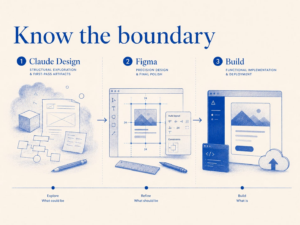
Explication du process product design IA / Design par Martin Pontegnier entre claude et Figma
Les outils IA comme Lovable ou Claude sont vraiment faits pour l’exploration, le premier jet, les prototypes qu’on sort avant une réunion pour convaincre. Figma reste l’outil du design de précision, de la maintenance du Design System, de la validation UX finale et de la revue accessibilité. Et le dev, que ce soit Claude Code ou le codebase, intervient uniquement à partir d’un livrable validé par le design, jamais depuis un output IA brut.
Si quelqu’un se demande « est-ce que j’utilise un outil IA pour ça ? », ma réponse c’est oui quand l’objectif est de faire de l’exploration rapide ou un premier jet, et non quand on est sur du design d’interaction précis ou de l’implémentation.
Ce qu’on a vécu à Santexpo
En mars, Clément et moi avons prototypé la messagerie instantanée sur Lovable juste avant Santexpo. En quelques heures, on avait quelque chose de vraiment interactif. Ce n’était pas une série d’écrans cliquables Figma, ni un livrable parfaitement cohérent avec notre Design System, mais un vrai flux vivant qu’on pouvait mettre directement en main des clients sur place. Et ça a complètement changé la façon dont on a présenté et vendu le produit.
Clément, PM :
Pour le plus gros salon santé de l’année, nous voulions présenter à nos clients cette nouvelle solution sur laquelle nous sommes en train de travailler. Mais préparer une démo pour ce rendez-vous aurait ralenti et allongé le travail de nos développeurs.
Les outils IA nous ont donné l’agilité nécessaire et nous ont permis de sortir une démo présentable à un client. Le tout en quelques heures de travail, en nous basant sur les maquettes de Martin pour respecter la charte et le Design System.
Les retours de nos clients ont été super positifs et on a pu récupérer beaucoup de retours et de cas d’usages pour adapter notre vision.
Ce que j’en retiens, c’est que les outils IA et Figma n’ont vraiment pas le même but : l’un convainc, l’autre construit. Les deux sont nécessaires, mais pas au même moment.
Attention tout de même, avant de vous lancer : ces outils fonctionnent avec des tokens qui peuvent coûter assez cher, surtout chez Lovable. La facture peut vite grimper, donc n’hésitez pas à demander au Pôle Product Design pour les bonnes pratiques.
Si on devait résumer
Avant qu’un écran parte en dev, il doit être validé par l’équipe design : pas pour refaire tout le travail, mais pour se poser les bonnes questions. On doit s’assurer que ce qui part est solide, que l’écran répond à un vrai besoin, qu’il s’intègre correctement dans le parcours utilisateur et qu’il répond vraiment aux attentes des utilisateurs.
L’objectif, c’est d’éviter de livrer les 40 % en croyant avoir fait 100 %.